
Ketika sebuah konten sudah dibuat, maka konten tersebut akan menampilkan nama user yang membuatnya. Misal kita ingin membuat yang tampil tersebut adalah realname bukan username. Ini berguna jika website yang dibuat memiliki banyak user. Berikut caranya
Pertama pastikan module core profile sudah aktif, jadi kita bisa membuat field untuk realname tersebut.
Buka profile admin/user/profile pilih single-line textfield.
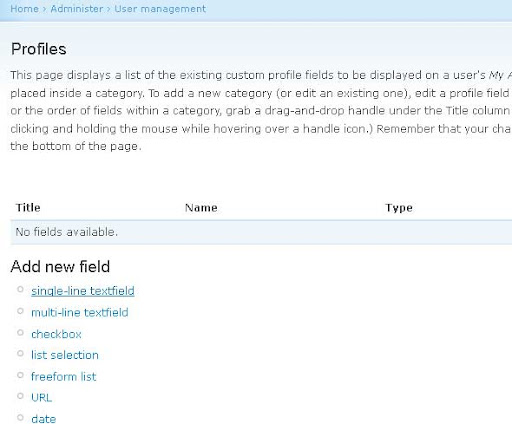
Isi dengan data seperti dibawah
Category = Personal Information
Title = Full Name
Form name = profile_realname
The user must enter a value = Ceklist
Visible in user registration form = Ceklist

Klik save, dan field realname sudah bisa di lihat dan bisa di isi dengan nama lengkap user di profile user tersebut
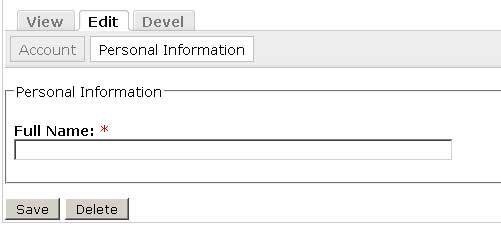
Bagian Menampilkan real name
Berikutnya adalah mengganti username dengan field realname yang sudah dibuat.
Aktifkan module devel dan theme developer. Klik kotak Themer info di pojok bawah kiri browser, pastikan Themer info sudah terpilih dengan tanda ceklist.
Kemudian cari node yang menunjukan nama author klik pada nama author tersebut dan kotak Drupal Themer Information akan muncul.
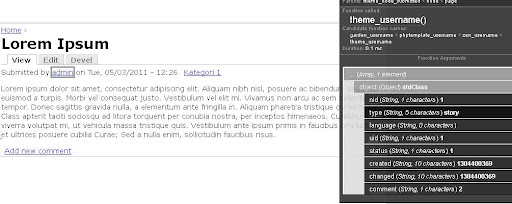
Bisa di lihat pada baris Candidate function names: bahwa nama function yang di pakai adalah garden_username. garden ini adalah nama theme yang di pakai.
Buka file template.php di folder theme, berhubung theme yang aku gunakan adalah STARTERKIT dari ZEN maka file template.php tersebut sudah ada.
Buka juga file includes/theme.inc, cari function theme_username() dan copy function tersebut ke file template.php dari theme kita.
function theme_username($object) {
if ($object->uid && $object->name) {
// Shorten the name when it is too long or it will break many tables.
if (drupal_strlen($object->name) > 20) {
$name = drupal_substr($object->name, 0, 15) .'...';
}
else {
$name = $object->name;
}
if (user_access('access user profiles')) {
$output = l($name, 'user/'. $object->uid, array('attributes' => array('title' => t('View user profile.'))));
}
else {
$output = check_plain($name);
}
}
else if ($object->name) {
// Sometimes modules display content composed by people who are
// not registered members of the site (e.g. mailing list or news
// aggregator modules). This clause enables modules to display
// the true author of the content.
if (!empty($object->homepage)) {
$output = l($object->name, $object->homepage, array('attributes' => array('rel' => 'nofollow')));
}
else {
$output = check_plain($object->name);
}
$output .= ' ('. t('not verified') .')';
}
else {
$output = check_plain(variable_get('anonymous', t('Anonymous')));
}
return $output;
}
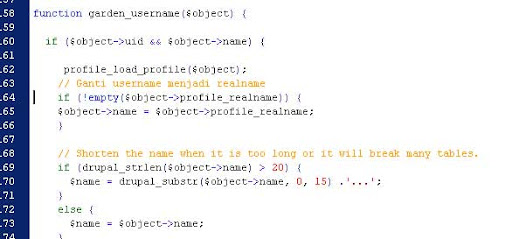
Setelah fungsi di atas sudah di copy ke dalam file template.php, rename theme_username() menjadi garden_username(). Sisipkan baris yang dicetak tebal dibawah perintah if yang pertama.
function garden_username($object) {
if ($object->uid && $object->name) {
profile_load_profile($object);
// Ganti username menjadi realname
if (!empty($object->profile_realname)) {
$object->name = $object->profile_realname;
}
// Shorten the name when it is too long or it will break many tables.
if (drupal_strlen($object->name) > 20) {
$name = drupal_substr($object->name, 0, 15) .'...';
}
else {
$name = $object->name;
}
Setelah selesai save file dan tutup saja semua file yang sudah di buka. Clear theme registry dan lihat hasilnya dengan membuka node yang menampilkan author name.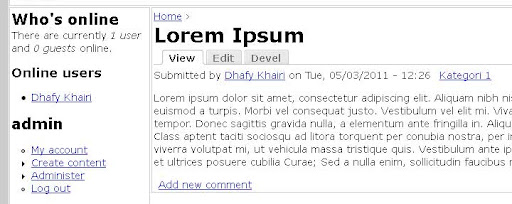
Jika ada pesan Fatal error: Cannot redeclare theme_username(), artinya nama theme belum di sesuaikan dengan nama theme yang dipakai. Modul drupal yang mirip dengan fungsi di atas adalah realname
Sumber: Drupal 6 Theming Cookbook